Hotels
Buildings, floors, categories, group bookings and corporate clients.
Reservations, front desk, room inventory, housekeeping, cash desk, finance and analytics run in a single loop. Data is entered once.
The demo runs on your own property data and takes 30 minutes.
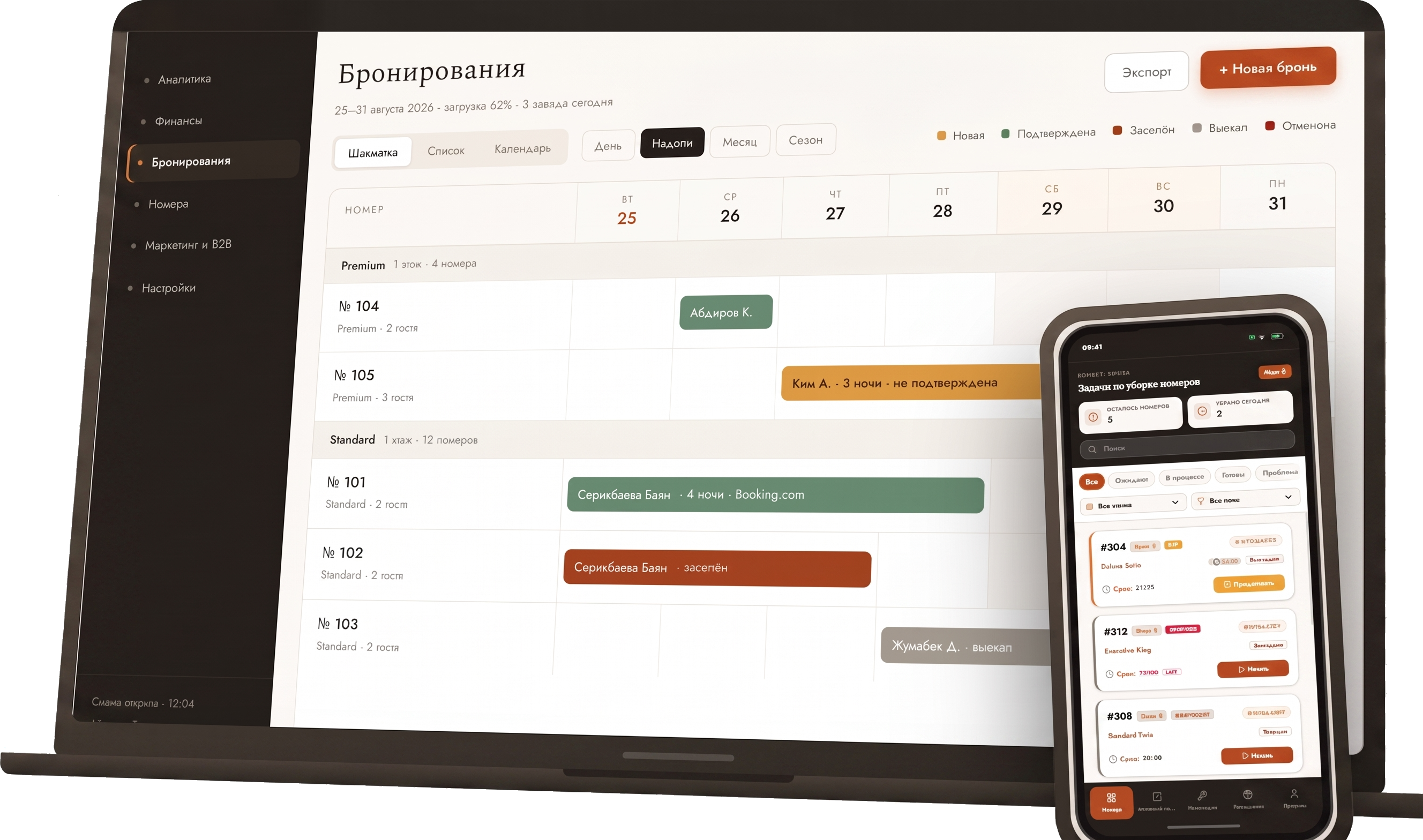
The system carries the property through the whole stay cycle: enquiry, reservation, confirmation, check-in, stay, check-out, closing of financial operations. Every step is linked to the guest, the room, the rate, payments, extra services and the sales source.
Sollviera is built for hotels, apart-hotels, hostels and guest houses. The configuration follows the format of the property, not the price plan you pick.
Buildings, floors, categories, group bookings and corporate clients.
Long stays, room moves, extensions, services on request.
Beds, quick bookings, high inventory turnover.
Small inventory, one receptionist, the full operational loop.
A booking taken on an OTA is copied into the chart by hand. One transfer error becomes a double sale.
The result comes together after the month closes — when nothing can be changed anymore.
Room readiness exists only as spoken word and lives until the end of the shift.
Guest history belongs to the receptionist rather than to the property.
Dates run horizontally, rooms vertically. Dates are changed straight on the chart. Three views: chart, list, calendar. Booking status is visible by colour.
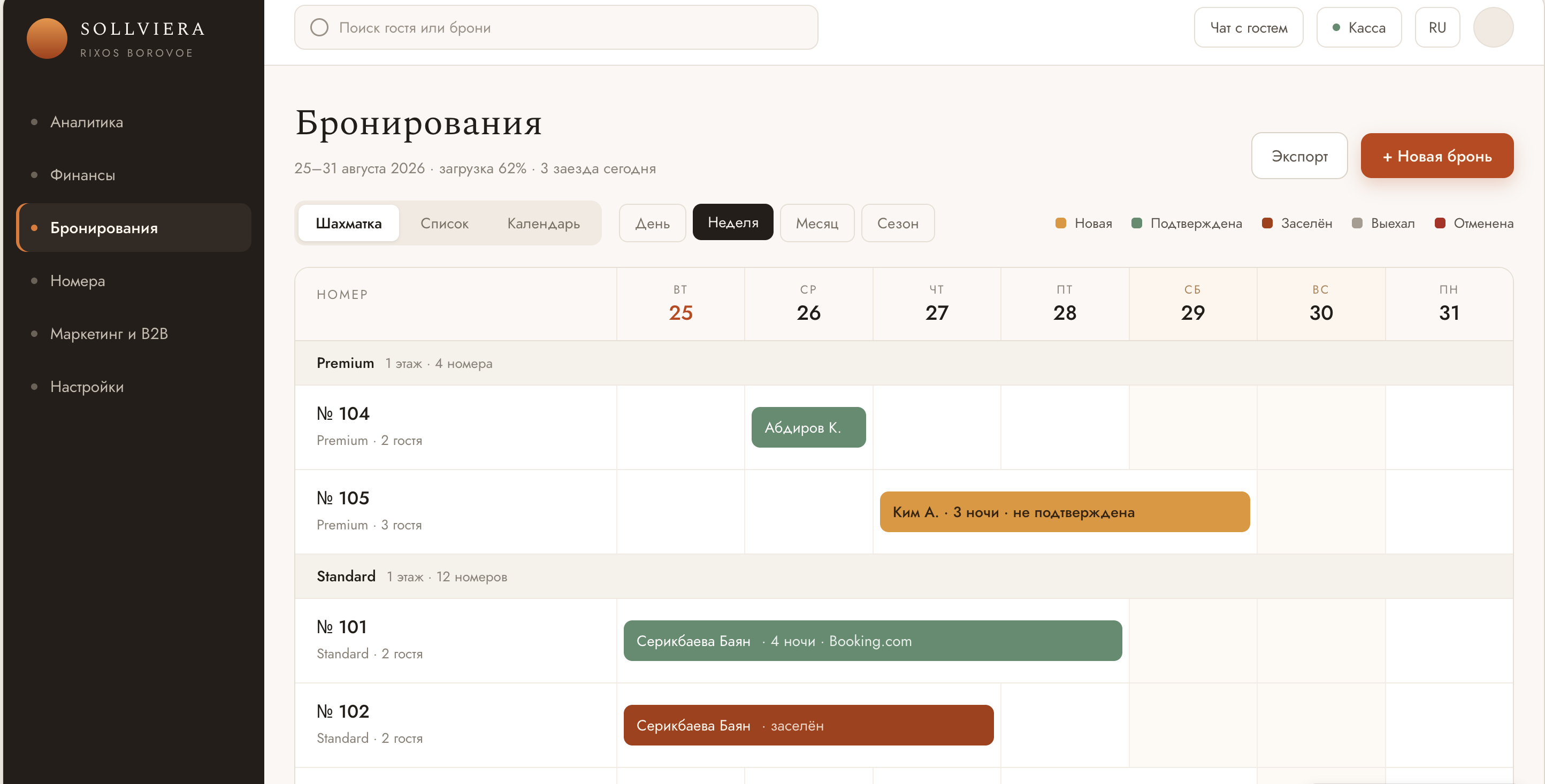
Chart, list, calendar. Individual, group and quick bookings. Search and filtering by category, number of guests, status and source. Dates changed from the chart. Booking card. Statuses: new, confirmed, checked in, checked out, cancelled.
Reservations: chart, list and calendar views, booking statuses and occupancy for the period.
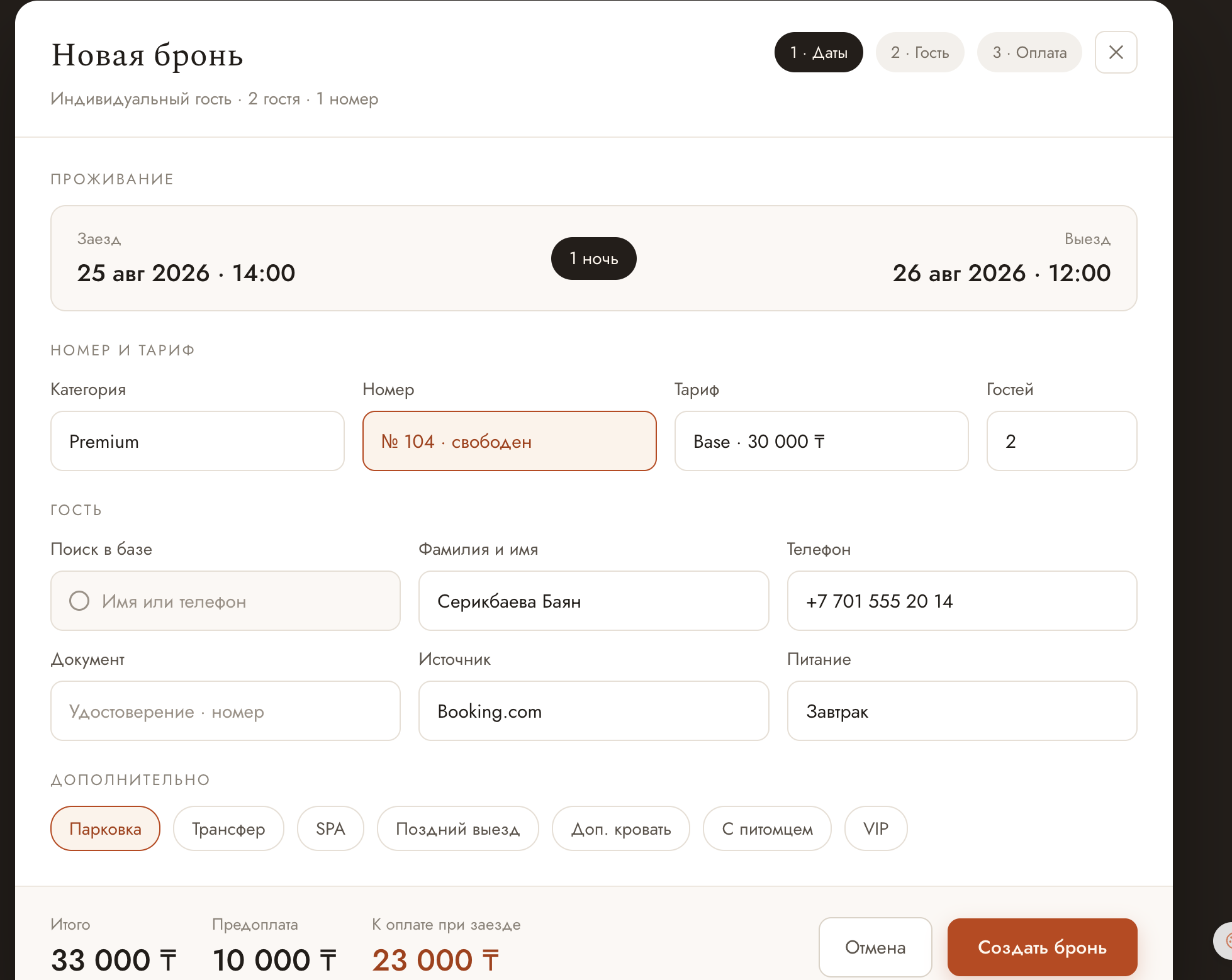
Check-in, service during the stay, room moves, extensions, check-out, settling balances, printing and sending documents, handing the room over to housekeeping. Free rooms are highlighted when a category is chosen, and the guest is found in the base by name or phone.
Creating a booking: dates, category, free room, rate, guest and payment in one form.
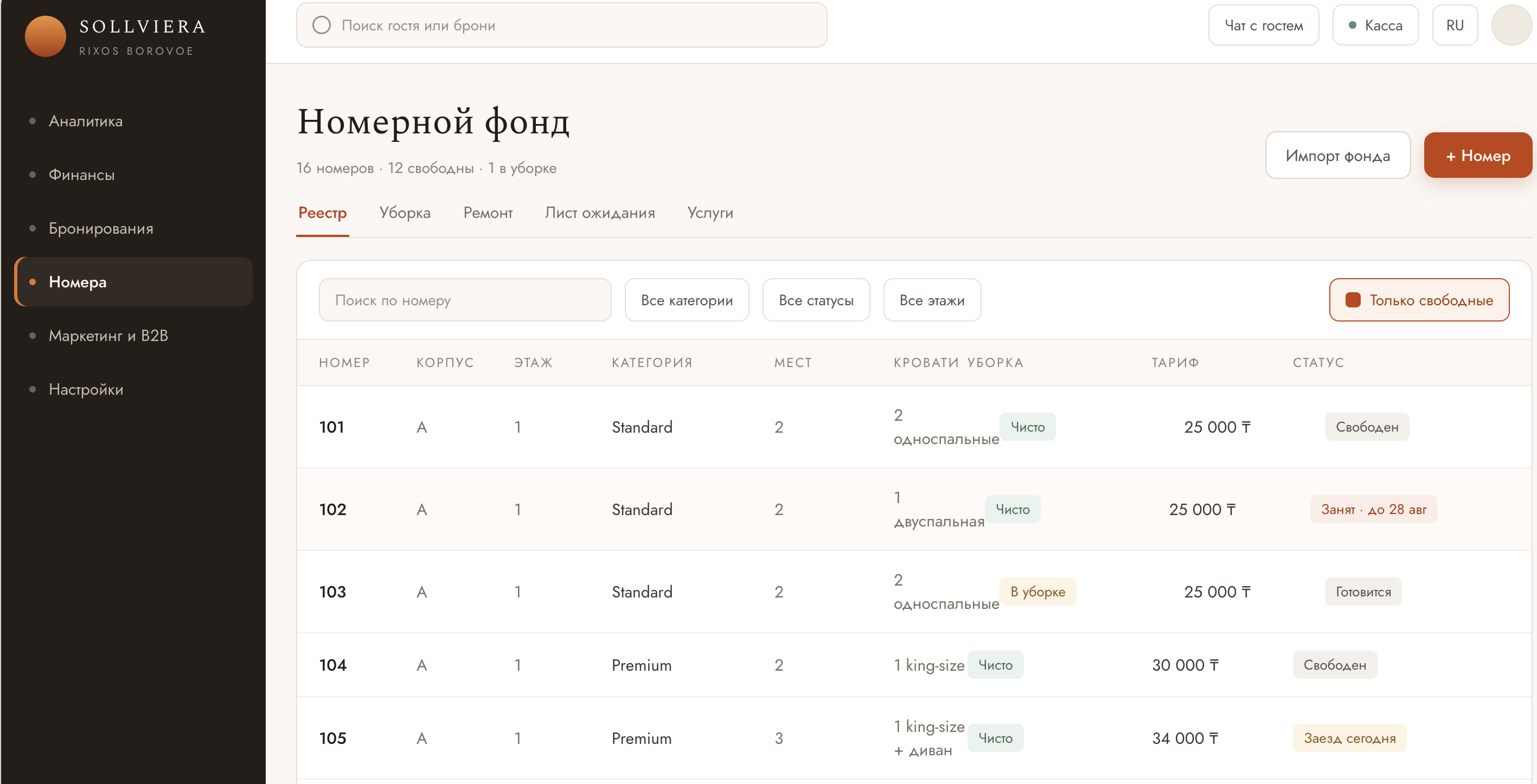
Register with building, floor, category, capacity, bed type, rate and cleaning status. Room card with rates and history. Housekeeping. Maintenance. Waiting list. Service catalogue and requests, including a separate restaurant queue. Excel import and export.
Inventory register: building, floor, category, capacity, rate, cleaning and occupancy status.
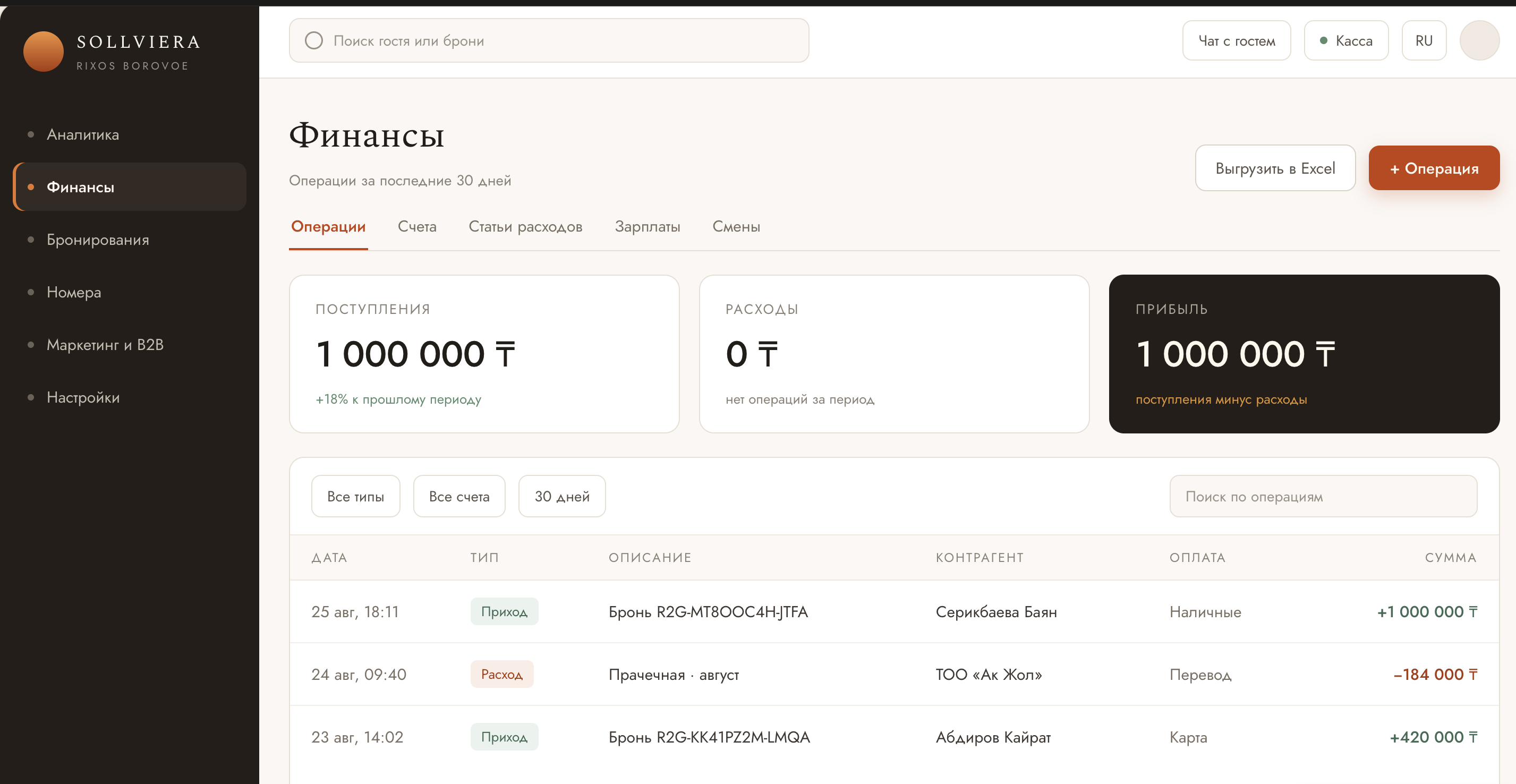
Transaction log: date and time, type, account, source, description, counterparty, payment method, amount — every operation is linked to a booking and a guest. Property accounts, expense categories and subcategories. Payroll calculation, shift timesheet, Excel export. Cash desk: cash in and out, refunds, balance, opening and closing a shift, cash report.
Finance: transactions, accounts, expense categories and cash shifts.
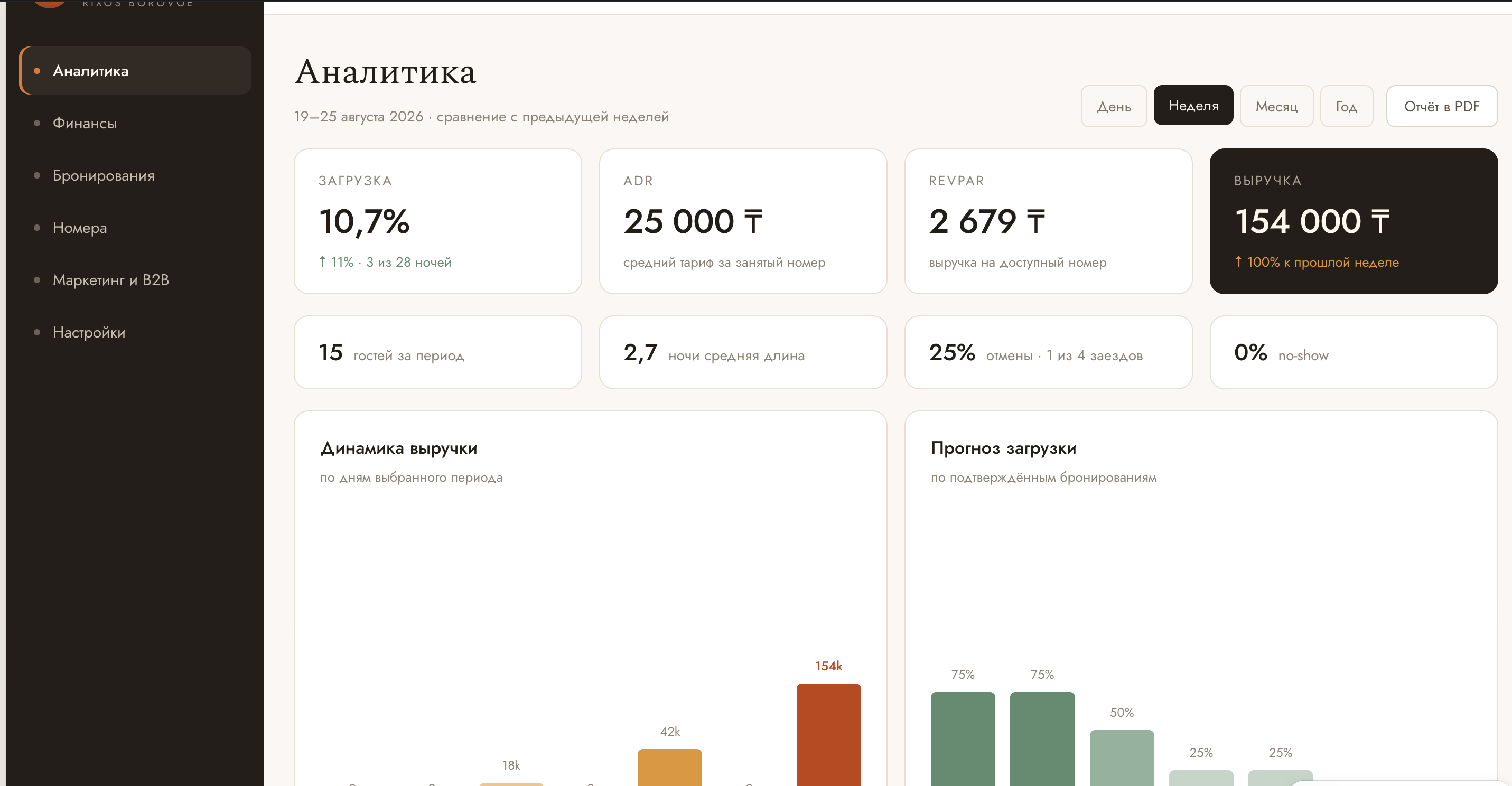
Periods: day / week / month / year. Occupancy, ADR, RevPAR, Revenue, GOP, guest count, room nights, ALOS, cancellation rate, no-show rate. The metric set is configurable. Occupancy forecast. Management report exports to PDF.
Analytics: indicators for the period and the occupancy forecast.
Incoming and outgoing messages, comments, dialogue linked to the guest and the booking. The thread stays available to the next shift.
Catalogue of property services, requests linked to a guest or a room, a separate queue for the restaurant.
Property profile and legal details. Roles and access rights per section. Staff management. Document templates with placeholders. Integration marketplace. FAQ.
Workspaces for housekeepers, maintenance and supervisors: shift tasks, timer, checklist, photo records, requests, trolley inventory, offline mode, RU / EN.
The wage fund sits next to income for the same period, so the cost per room stops being an estimate. The shift timesheet and payroll table export to Excel for accounting.
A mobile app with role-based access for housekeepers, maintenance and supervisors. Work is recorded as it happens, not at the end of the shift.
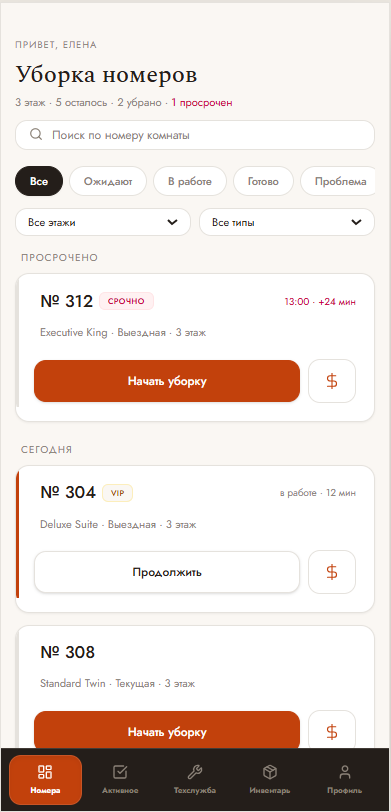
Shift tasks: overdue rooms, priorities, filters by floor and cleaning type.
Shift tasks with priority, deadline and the number of rooms left on the floor. Status is visible by card colour: waiting, in progress, ready, problem, checked by supervisor.
In the room: cleaning timer, checklist by zone, special instructions from the booking card, photo record of the zone, pause, request for supplies. A fault found is filed as a maintenance request straight from the room, with a photo.
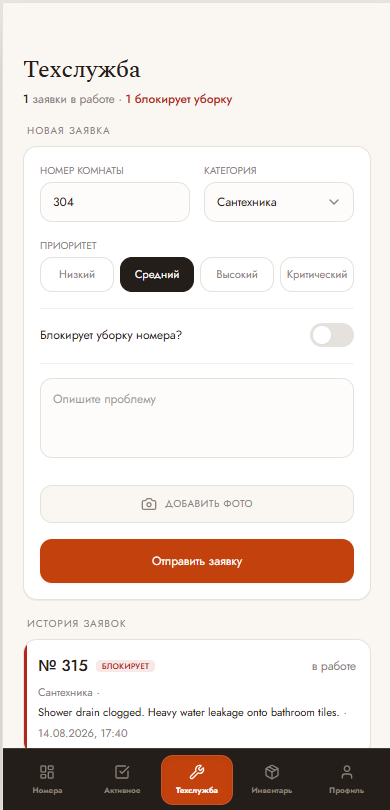
Maintenance request: category, priority, "blocks cleaning" flag, photo of the defect.
A request carries the room number, fault category, priority, description and photo record, plus a flag showing whether the fault blocks cleaning. Request history is kept with completion statuses.
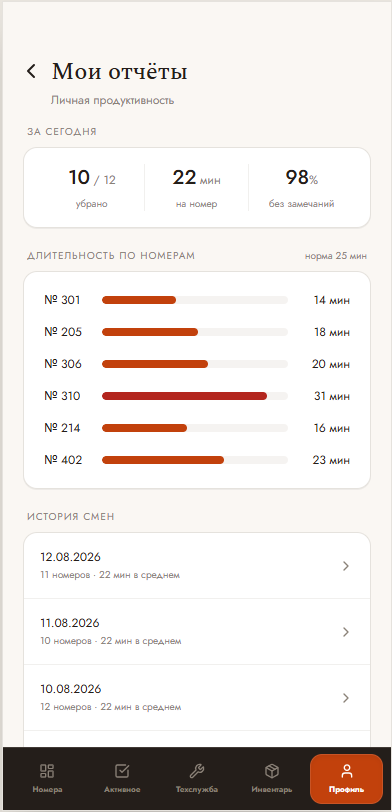
Personal reports: rooms cleaned, average working time, quality score, shift history.
Shift tasks in real time, workload distribution, history for every employee, confirmation of the "checked" status after inspection.
After a month of use, average cleaning time, workload per employee and fault frequency per room become measurable figures.
Check-in, check-out, room allocation and document generation happen in one window. Routine work stops consuming the whole shift and the load on staff drops.
Rates and sales channels are managed from one place. Direct bookings from the property website carry no intermediary commission.
The built-in CRM accumulates guest history, segments the base and lets you build communication by segment rather than from a receptionist’s memory.
A mobile app with separate workspaces for cleaners, maintenance specialists and supervisors. Completed work is recorded and quality is verified against the fact.
Analysis periods: day, week, month, year. The set of displayed metrics is configurable. The occupancy forecast for future dates is built from confirmed bookings. The management report needs no manual data assembly and exports to PDF for any period.
GOP on this list means the system knows the property’s expenses, not only its revenue.
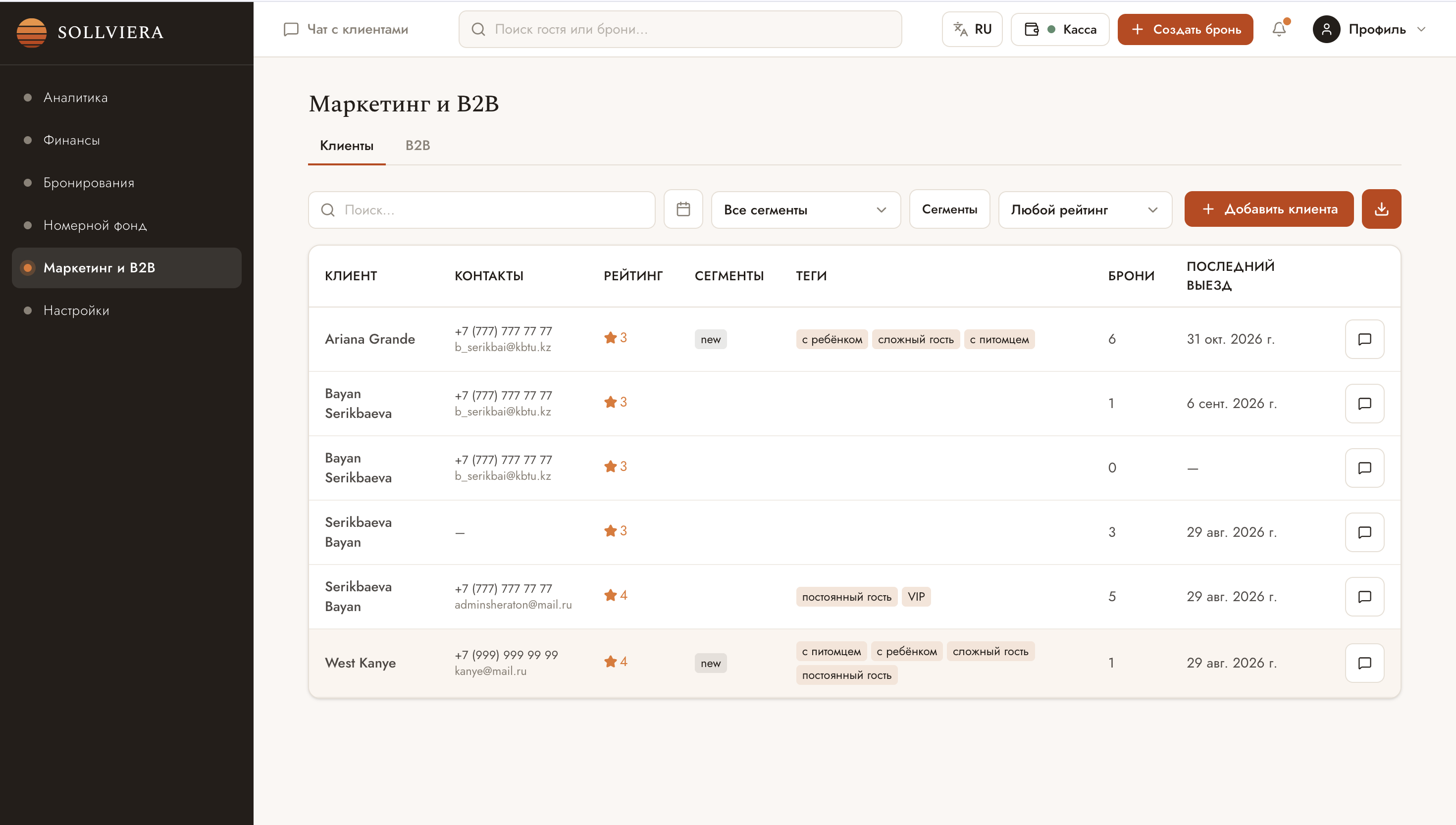
Guest history, segments and rating live in the system rather than in a receptionist’s notebook. Campaigns, corporate clients and contracts all run on that same base.
Automated scenarios triggered by defined events, and manual campaigns with a choice of audience, content, channel and send time.
Guest segments and rating, tags such as "returning guest", "with a child", "VIP". Filters by segment, rating and date, plus data export.
Private guests and corporate clients are kept apart: type, status, partner company card, its own terms and rates.
Templates are filled with booking data through placeholders. A contract is generated, printed and sent to the guest from the card, with no retyping.
Roles are created to match the property structure, rights are set per system section. Employees are added separately and assigned roles.
Shift management, timesheet and work history — tied to payroll calculation.
Name, type, category, contacts, addresses and bank details. Additional services connect through the integration marketplace.
Migrating the guest base, the archive and future bookings takes 24–48 hours. The property keeps taking bookings throughout.
The system is shown on the property’s own inventory and rates.
Active bookings, rates, archive and guest base are moved in full, with no pause in sales.
Sales channels, hardware and third-party services per the agreed list.
Separately for the front desk and for the floor: receptionists and mobile roles.
A dedicated specialist through the first weeks of operation.
The exact price is fixed against your room inventory during the demo.
For properties above 20 rooms the price is calculated by room count.
Covers migration of active bookings, rates and the guest base, integration setup per the agreed list, and staff training.
Pricing, statutory requirements, data migration and how support works. Anything not covered here can be raised during the demo.
A PMS (Property Management System) is hotel management software that brings reservations, check-in, settlements, reporting and staff operations into one program. It replaces spreadsheets and paper logs: the front desk keeps the room chart current in real time, while the owner sees occupancy and revenue for the property.
Sollviera is a cloud hotel management system (PMS) for the hospitality business in Kazakhstan. It is developed by Tech Noir LLP, Almaty. Sollviera runs in a browser with no installation, and data is hosted on servers in Kazakhstan. The product is built for hotels, apart-hotels, hostels and guest houses up to the four-star segment.
Four things are worth checking. Whether the system covers the statutory requirements — foreign guest registration in eQonaq and fiscalisation of settlements; where guest personal data is physically stored; which time zone and languages support works in; and how pricing is calculated across several properties. The first point rules out most foreign systems: eQonaq and Kazakhstani fiscalisation are local requirements absent from products built for other markets.
Hotels, apart-hotels, hostels and guest houses. The configuration follows the format of the property, not the plan you pick. For small properties up to 20 rooms the subscription is 25,000 ₸ per month — a rate sized for guest houses and small hotels where one or two people use the system.
Yes. Properties accommodating foreign nationals must report them through the state eQonaq system, and guest settlements must be accompanied by a fiscal receipt transmitted to the fiscal data operator. Both requirements are mandatory and do not depend on the size or star rating of the property.
Yes. Sollviera submits foreign guest arrival data to eQonaq directly from the system — it leaves from the same screen where check-in happens. The fiscal receipt is produced in the cash module through Webkassa at the moment of settlement and sent to the fiscal data operator. No separate portal, no separate till, no duplicate manual entry.
The Sollviera subscription starts at 25,000 ₸ per month for a property of up to 20 rooms, which is 1,250 ₸ per room. Above 20 rooms the price is calculated by room count. Implementation is a one-off 150,000 ₸: migration of live bookings, rates and the guest database, integration setup and staff training. Basic support is included in the subscription.
The subscription covers the system itself, updates, basic support and daily backups retained for 30 days. There is no separate charge for connecting sales channels, additional workstations or staff access to the mobile app — the rate is set by room count alone. Hardware is charged separately if the property needs it.
Sollviera prices groups on a descending scale: the first property pays the full rate, the second 75%, the third 65%, the fourth 55%, the fifth and each one after that 50%. Billing runs on a single invoice with the group discount rather than separate payments per property. Occupancy and revenue across all properties roll up into one dashboard.
No. Sollviera runs in a browser on a computer, tablet or phone with no installation and no server purchase — an internet connection is all that is required. Updates are applied by the developer. On request the system can be hosted on the property’s own servers; that option is scoped during the consultation.
Data sits on servers in Kazakhstan, with infrastructure provided by Kazakhtelecom. Guest personal data is not moved outside the country. Backups are taken daily and kept for 30 days; user action logs are kept for 12 months. Availability is guaranteed at 99.5% of time per month and stated in the public offer.
Migrating room inventory, the rate grid, the guest database and live bookings takes 24–48 hours, and the property keeps taking bookings throughout. A Sollviera specialist performs the migration. Roll-out runs in five stages: demo, data migration, integration setup, staff training held separately for the front desk and the floor, and go-live with support through the first weeks.
Yes. A role-based app for housekeepers, maintenance and supervisors: shift tasks, cleaning timer, zone checklist, photo capture, maintenance and supply requests, trolley inventory, personal reports, chats and an offline mode that syncs when the connection returns. Staff access to the app is included in the subscription.
Support works 09:30 to 18:30 Astana time in Russian and Kazakh, and basic support is included in the subscription. Sollviera is developed and maintained by Tech Noir LLP, BIN 240740034355: 50 Nauryzbai Batyr Street, office 532, Almaty, phone +7 707 727 24 02, email hello@sollviera.com.
The system is shown on your data: room inventory, categories, rates. After the meeting you receive the list of required integrations with timelines and a price calculation.